
 Mosaicx
How to Build, Train, Test, and Deploy Conversational AI Solutions in 2026
Conversational AI is rapidly becoming a critical tool for businesses of all sizes. It can help businesses improve customer service, increase sales,...

Your customers don't care about your internal processes. They care about getting what they need without waiting on hold or explaining their problem three times to three different people.
Customer experience automation is the system that makes that happen. It handles customer interactions without the friction that comes from manual handoffs or disconnected channels.
This guide walks you through CXA and how to implement it without the common mistakes that turn automation into another layer of frustration. You'll see which use cases to start with and what to avoid when building workflows that customers will actually use.
Your customers expect fast and accurate responses, even if they call outside business hours. They’ll also switch channels and expect your support to remember their last interaction. More importantly, customers don’t like to wait. They’d rather solve their problems themselves than wait on hold for 10 minutes just for a generic solution.
Businesses that fail to meet these growing expectations start pushing their customers towards competitors who can. Automation closes those service gaps to improve customer experience. Systems can reply instantly to common questions. They can also route issues to the right team without delay. This reduces wait time and confusion, especially during peak hours when manual support teams are swamped with high call volumes.
Remember that a single negative interaction can end a customer relationship. Companies that continue to deliver bad experiences end up losing millions annually to customer churn. Automated CX plugs that revenue leak and ensures loyal customers who spend on your products and services over longer periods.
Think of CXA as an assembly line for customer interactions. Each step happens automatically. Here’s a simple flow of what happens:
Let’s take a billing issue scenario showing how automated customer experience plays out.
A customer sends a message late Tuesday about an unfamiliar charge. The system identifies it as a billing issue and asks for the charge amount and date.
The customer provides the details and the system checks their account automatically. It finds the charge relates to a subscription renewal and explains the billing cycle. It offers to email a detailed invoice. The entire interaction takes 90 seconds.
If the customer disputes the charge, the flow shifts. The system routes the case to a billing specialist the next morning. The specialist opens the case with the full conversation, the charge details, and the customer’s account history already visible. No one repeats questions, and the call starts with context.
This same flow works across channels. The customer could begin with email, continue on chat, and finish on a phone call. The context carries through each step. An orchestration layer ensures all your systems work together so that your agents focus on resolutions instead of switching tools or re-entering data.
People often lump customer experience automation together with customer service automation or a CRM. The confusion makes sense because all three touch customer interactions. But they serve different roles and solve different problems.
CRMs store customer data. They’re a database that helps you remember your customers. Who bought what and when? When did they last contact you and why? CRM systems don’t automatically respond to customers or handle interactions. They're just a record-keeping system.
CSA focuses specifically on support tasks. It automatically handles tickets, routes inquiries, and helps agents resolve issues faster by reducing manual efforts. This can include replying to common tickets and populating forms. CSA, however, doesn’t manage the full customer journey.
CXA brings together the entire lifecycle. It connects your marketing, sales, service, and retention data across channels. This helps keep context and drive smarter decisions in continuity.
In summary, CRM tells you who the customer is. CSA helps them when something goes wrong. CXA ties all of these moments together into one continuous experience.
CXA isn’t just AI. There are several more cogs in the system that make customer experience automation possible.
Artificial Intelligence (AI) analyzes patterns to predict needs and automate decisions. It classifies incoming requests, chooses the right response, and triggers the next action in the flow. When a customer asks a question, AI decides whether to explain, route, or escalate. It acts within the boundaries the system defines.
Machine Learning lets those decisions improve over time. It reviews past interactions and adjusts how the system classifies intent and selects responses. No one has to keep on rewriting rules.
Natural Language Processing helps systems understand human language. It detects context and sentiment even when customers phrase the same request in different ways. “I can’t log in” or “I forgot my credentials” both lead to a password reset.
Chatbots handle conversations at scale. Basic ones follow decision trees so they always answer Y if customers say X. However, NLP enables virtual assistants to understand open-ended questions and generate contextual responses.
Analytics and reporting tools track every interaction and measure outcomes like customer satisfaction and conversations. This data reveals where automation works well and where it needs improvement.
Your customers aren’t the only ones who benefit from an automated system. Your agents and the business as a whole reap rewards as well.
Each industry handles unique customer interactions and pain points. Here’s how automation works in practice across key sectors.
Banks use automated systems to continuously monitor all transactions in real time. They analyze spending patterns to flag anything suspicious and alert customers immediately.
For example, someone travelling overseas will receive a notification to confirm a large purchase because their usual banking history is from another location. The verification process takes seconds and prevents fraud without blocking legitimate activities.
The accuracy also helps reduce false declines. Customers remain satisfied with the level of security without having to call your support to ask why their transaction was blocked.
CXA systems also reduce administrative burden by automatically resolving routine inquiries like checking balances and confirming recent transactions. This frees your teams to focus on complex issues while speeding up resolutions and boosting customer satisfaction without compromising compliance or security.
Patients benefit from CXA systems by requesting their next refills via apps or online portals. The system does an automated verification on the spot to confirm eligibility and sends confirmations in real time. Patients also receive reminders when their prescriptions are ready for pickup. This reduces wait times and, most importantly, the likelihood of missing refills.
If a pickup is delayed, automated alerts go out via text or app notifications to improve adherence and better health outcomes. The system can also answer routine questions like medication instructions or refill status without tying up your support. They can instead give more time to direct patient care.
The automation creates a consistent, reliable patient experience. Pharmacies see faster processing, fewer errors, and stronger customer loyalty, while patients get convenience and timely care.
Order tracking is handled automatically by pulling live carrier data to share tracking details at every step. Customers don't have to call the office to ask where their package is. The system keeps them in the loop, alerting them when their order ships or if it's delayed.
CXA systems also suggest products based on browsing history. Someone looking at running shoes will be shown moisture-wicking socks and fitness watches. The system also triggers personalized discounts based on purchase history. These features improve cross-selling capabilities without involving any manual team.
Returns and exchanges move through self-serve workflows that generate shipping labels, update order status, and automatically trigger refunds or simple exchanges.
Retail companies can also automate their feedback collection. Surveys are sent out on their own to ask customers about their experience with the product or support.
Customers receive automated confirmations with details after booking a flight or hotel. If the flight’s delayed, alerts go out immediately with rebooking options.
Customers can also manage their reservations by changing seats or rooms through chatbots. They don’t need to call the office for every single thing. They can literally change their plans while traveling without worry.
CXA systems also take the friction out of loyalty programs. Customers can check their points balance or redeem rewards on their own. If they have questions about earning points or when rewards expire, chatbots handle those instantly. It’s simple for customers and one less routine task for your team.
Customer experience automation significantly improves processing speed and completion rates. Customers upload documents from their phone for the system to verify eligibility. They don’t have to visit the office in person and wait in lines.
The system automatically alerts the customer if there’s something missing in their paperwork. This gives your front desk space to breathe. They stop fielding calls that most often ask why their claim was denied.
Fraud prevention is another key use case for the insurance sector. The system detects unusual claims patterns and escalates flagged cases for a specialist to review. This keeps your human judgment intact while reducing the overhead required to prevent fraud at scale.
Customers receive immediate notifications when there’s a service outage. They get to know about affected areas and estimated restoration times. The system also keeps them updated about ongoing progress. This prevents thousands of calls asking support about what happened.
CXA also helps with plan changes and usage monitoring. Customers check data usage, change plans, or add features through automated systems that calculate costs and confirm changes immediately. Alerts notify them when approaching data limits.
Questions about charges, payment due dates, and service fees get answered through automated chat as well. Payment processing and receipt generation all happen automatically.
Automating customer experience isn't as simple as buying a platform and turning it on. You need a structured approach.
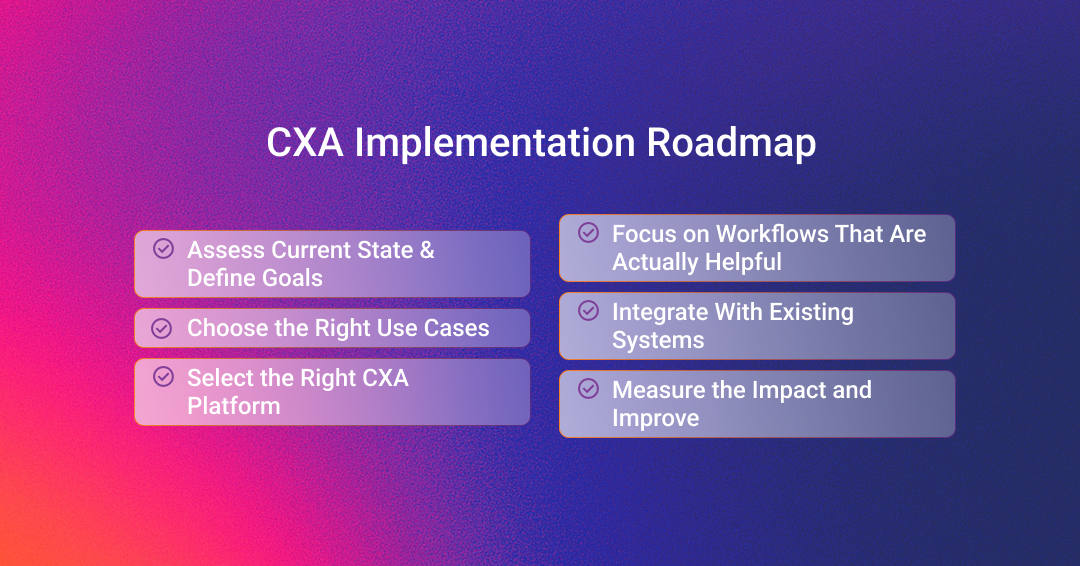
You can’t automate without knowing what’s broken. That starts with an honest audit of your current customer journeys. Walk through each channel and map their experience.
What are customers trying to do and where do they drop off? Where wait times spike and where agents repeat the same answers dozens of times a day? Document these pain points.
Then define what success looks like in numbers. The right metrics depend on your goals but the most useful ones at the start are CSAT, AHT, Containment, and Cost per Contact.
Set a baseline before any changes go live, or you won't be able to tell later whether CXA actually helped.
Not every customer intent should be automated first. The way to pick is with a scoring matrix. Rate each potential use case across four dimensions:
Score each intent across these four areas. The ones that score high on volume and low on risk are your Tier 1 use cases. These are the ones you start with.
Good first intents to automate include
Intents you should avoid automating first include
These require nuance, empathy, and often human judgment. Automating them too early leads to frustrated customers and broken trust.
A bad choice here will slow you down for months. Look for these specific capabilities:
Mosaicx checks most of these boxes directly. It's an AI-native platform built for enterprise customer service, with strong voice capabilities and end-to-end analytics. It's designed to replace rigid legacy IVR systems with something that actually adapts to what customers say and need.
An automation workflow that adds friction creates more problems. The goal is to make the customer's path shorter and clearer.
Keep these principles in place:
Automated customer experience doesn't work in isolation. The automation layer needs to talk to the systems that already hold your customer data.
The core systems to integrate with include:
The safest way to integrate is in phases. Start with read-only access so that the automation can look up information but can't change anything. Once that's stable and you've audited the results, move to write-back actions.
Going live is where the real work starts. Set up a KPI dashboard that tracks the metrics you defined in your assessment phase. But don't just watch the numbers. Build feedback loops into the process:
Do all this weekly during your pilot phase. Once you're past the initial rollout and things are stable, move to monthly reviews.
Here's the guardrail most teams miss: watch CSAT and CES alongside your deflection numbers. It's easy to celebrate a high containment rate while customers are quietly having a terrible experience. If deflection goes up but satisfaction goes down, you're automating the wrong way. That's the signal to slow down and look at what's actually happening in those conversations.
Most CXA projects fail because of bad decisions made before or right after deployment.
Automating an already confusing or inefficient process just makes it faster to get a bad experience. Hence, fix the process first. A sign that this is happening is when customers complete the automated workflow but still call back to complain afterward.
Satisfaction drops if you're pushing customers through automation when they actually need a human. Businesses often make this mistake because they’re trying to keep deflection numbers high. So watch your CSAT. It shouldn’t fall when containment rises.
Building separate chatbots for each channel means customers get inconsistent answers. Your channels need to share the same knowledge and logic.
The automation is only as accurate as the information it draws from. If your knowledge base hasn't been updated in months, the system will confidently give outdated answers.
For example, your agents keep correcting customers after automated interactions. That's a knowledge problem. Fix it by assigning someone ownership of the knowledge base updates and reviewing content on a set schedule.
Cost reduction is one benefit of CXA but it's not the whole picture. If you only track how much money the automation saves and ignore how customers actually feel about the experience, you'll optimize for the wrong thing.
Here’s a sign from the real world: the finance team is happy, but NPS or CSAT trends are flat or declining. Cost savings at the expense of experience might work short-term but have long-term consequences.
We built Mosaicx for enterprises that need CXA to work across voice and digital channels without the gaps that come from piecing together multiple vendors.
Engage handles the conversations. It's our conversational AI platform that’s designed to make interactions feel natural instead of robotic. Our IVAs understand multiple languages, detect tone, and work seamlessly across phone, text, and mobile apps.
When a customer calls or messages, Engage interprets what they need and resolves it without forcing them through rigid menus or keyword prompts. The system also keeps context across channels, so if someone starts a chat and later switches to a phone call, the IVA or agent picks up exactly where the conversation left off.
Journey Insights and Insights360 tell you what's actually happening. Journey Insights tracks where automation succeeds and where it breaks down. Insights360 goes further by following the entire customer journey from dial to disconnect. It surfaces root causes of escalations and shows you where workflows need fixing. Together, they give you a complete picture — the why behind your containment rates.
We also offer our custom dashboard to pull all of this into one view. You can see data on customer interactions in real time and track which issues agents are handling most often.
Schedule a demo if you're ready to see how voice and digital customer experience automation actually connects across your contact center. We'll walk you through how our solutions work with your existing setup.

Conversational AI is rapidly becoming a critical tool for businesses of all sizes. It can help businesses improve customer service, increase sales,...

One of the most common pain points for any customer service business is the cost of unanswered calls. You not only frustrate your customers who might...
.png)
Modern contact centers operate in a fundamentally different environment than before. There's a long line of customers coming through multiple...