
 Mosaicx
How to Build, Train, Test, and Deploy Conversational AI Solutions in 2026
Conversational AI is rapidly becoming a critical tool for businesses of all sizes. It can help businesses improve customer service, increase sales,...

Conversational AI is rapidly becoming a critical tool for businesses of all sizes. It can help businesses improve customer service, increase sales, and automate tasks.
If you're considering implementing a conversational AI solution, there are a few things to consider. First, you must define the scope of your solution. Next, you must gather and prepare training data.
Finally, you must know the best implementation process to avoid disruption for your customers. This blog walks through each of these key considerations.
There are many benefits to using conversational AI solutions. Cutting costs is just one of them. Businesses are handling more interactions with fewer bottlenecks. Here's what that actually looks like in practice:
You need a proper plan before writing a single prompt. This is because the decisions you make at the build stage determine how well the system performs in production. So think through each of these areas before you touch any tools.
Start with one problem. What are the most common tasks your team handles manually? Where do users get stuck? Pick the interaction with the highest volume but that is also simple to handle. That could be booking appointments, answering FAQs, or checking order status.
Then define what "working" looks like. That might be the containment rate or average handle time. You can't measure whether the system is actually doing its job if you don't have a clear metric.
This decision shapes everything else. Voice deployments need different logic than chat. Think about how users speak differently from how they type. Voice also has to deal with unclear audio and interruptions. SMS is more transactional and limited by character constraints.
Map where your users already are and what kind of interaction they expect in that channel. A healthcare practice booking appointments works well on voice. But a retail brand handling order updates works well on chat or SMS. The channel should match the use case, not the other way around.
Draw out how a conversation actually flows from the first message to a completed task or a handoff to a human. For each journey, list the user’s main intents and the points where the conversation might break down.
Now set a clear escalation path for every flow. What happens when the AI doesn't understand the request? Who should step in and with what context?
The AI can only answer what it knows. So gather and organize all the information it will need. That means FAQs, product details, service descriptions, policies, pricing, etc—anything users ask about on a regular basis. Then assign clear ownership for updating the knowledge base. This ensures that AI always has accurate information.
List every system the AI needs to connect with to do its job. For example, appointment booking needs your calendar and lead intake needs your CRM.
Then identify what data the AI needs to read and what actions it needs to take. Check if those systems have APIs and whether your platform will require custom development.
Integrations that aren't planned before building become expensive patches after launch.
Some conversations contain sensitive information. You need to know what regulations apply to your industry before setting up any AI solution. You can't have the system reveal health information or financial details to the wrong person. That's only going to get you fined.
Frameworks like HIPAA or GDPR dictate exactly how data must be stored and shared. You also need to define who can modify the AI's behavior and how changes get approved. Good governance is what keeps a well-built system running smoothly over time.
You can't just invest in a system and expect it to solve all your problems. You need to train the AI on how to behave and respond to users. That training is what makes the system capable of handling edge cases and unexpected situations.
Collect examples of how actual users phrase their requests across channels. The more varied and realistic the examples, the better the model handles natural language in production.
The data needs to be cleaned as well before use. Remove duplicates and fix formatting inconsistencies. Anything that doesn’t reflect genuine user input needs to go.
Low-quality training data produces low-quality behavior, regardless of how capable the underlying model is.
An intent taxonomy is a list of what users can ask for in your system. Begin with broad categories like booking or pricing questions, and then break those down into more specific intents where it makes sense.
Once you have that structure, write and label multiple example phrases for each intent based on how real people actually speak. Mix up the wording. Use different sentence structures and levels of detail so the AI learns to recognize variety.
The labeling process reveals gaps in your taxonomy, which helps you clearly define where one intent ends and another begins.
The next step is to train the intent classification model and configure the system’s response logic. This means writing and testing prompts for LLM systems to see which ones produce the right behavior.
For flow-based systems, though, you have to map intents to actions and define the rules that govern each step. These policies set the guardrails to note what the system can and can’t do. How it handles a vague input and when it decides to escalate to a human.
Every system will encounter a request it can't handle. Define what happens in those moments. For example, how should the AI respond if it can’t identify an intent? Does it ask a clarification question or transfer the conversation to a human after a couple of failed attempts?
Then define clear handoff rules. How should a human agent step in and what context should they already have? A well-designed handoff passes the full conversation history, the identified intent, and any data collected so the user doesn't have to repeat themselves.
Challenge the system with example situations it hasn’t seen during training. This gives you a more honest view of how well it actually performs.
Look at key metrics like intent accuracy, response relevance, and whether conversations successfully reach completion. Then go a step further and run structured test conversations that mirror real user journeys.
Identify where the system fails and trace failures back to their source. Is it a training data gap or a prompt issue? Fix these issues before going live.
Make it a habit to regularly review conversation logs after the system goes live. Look for patterns in failed intents and unexpected drop-offs. See why escalations happened when they should have been handled automatically by the AI.
Those patterns show you where it needs improvement. Use what you learn to add new training examples and refine existing intents.
Testing is where you find out whether the system you built actually works in real situations. Work through each of the areas below before you deploy your conversational AI system.
Pick a use case and map the expected conversation path the way a real user would experience it. What does the user say first and how should the system respond? What information does it need to collect along the way and how does it end?
Then define what success looks like. That might be an intent classification accuracy above 90% or less than 10% incorrect escalations for specific test cases.
Setting those thresholds up front ensures that your testing turns into data instead of opinions.
You should always go through core flows manually before running any automated tests. This is because automated scripts aren't reliable. They'll pass responses that are technically correct but practically useless.
Have your team use the system the way actual customers would. Let them ask messy questions and log every moment the system gets something wrong or even just feels slightly off.
Regression tests confirm if a fix in one area broke something in another. These need to be run every time you update the system.
Start with use cases with the highest volume like appointment booking or FAQ handling. Run your automated regression test workflow against each journey and then expand from there. The goal is catching regressions before users do.
Don’t just assume the knowledge layer works. Ask the system questions you know it should answer correctly. Then try questions that only partially match what’s in the knowledge base. Finally, throw in questions it absolutely shouldn’t be able to answer from the knowledge base.
Make sure each answer is accurate and relevant. It shouldn’t be just something vaguely related. You also want a clean fallback when it can’t answer. This should be a clear “I don’t have that information” or a proper escalation. What you don’t want is a confident, made-up answer.
If you’re using RAG (retrieval-augmented generation), take it a step further. Check the source content it retrieves and confirm it genuinely maps to the question being asked. Retrieval only helps if it’s pulling the right context in the first place.
If your system depends on a calendar, a CRM, or an order management platform, you need to see those integrations work in the real world.
Run test conversations that trigger actual API calls and confirm the data comes back correctly. Make sure the right record is pulled or the right slot is booked.
Then flip the scenario. What happens when the calendar is down? When the CRM times out? The system shouldn’t freeze or throw a mere error message to the user. It should explain the issue clearly and guide the user to the next best step.
And don’t forget edge cases. Real users send long, messy messages. They often provide half the required information and go completely off-script. Your system has to handle all of it without breaking down.
It’s easy to make a system look good in a single, controlled conversation. The real question is what happens when hundreds of conversations are happening at once.
Run load tests that simulate your expected peak traffic. Then push beyond it. Test 300 simultaneous sessions if you think you’ll handle around 200. That’s how you find the breaking point before your customers do.
Don't forget to measure response time closely. Set a clear latency threshold you’re willing to accept. For voice, most users expect a reply within two seconds. Watch how that latency changes as concurrent sessions increase.
Review every failure and document three things: what the user did, how the system responded, and what it should have done instead. That clarity makes it easier to trace the issue back to its root cause.
Fix the cause and then retest that exact scenario to confirm it’s truly resolved. Close the cycle only once every issue has been verified. Make sure to always keep your test suite running on a schedule after launch so new problems surface quickly instead of quietly stacking up.
Deployment isn’t just about pressing a switch. You need to make sure the system is reliable and ready for real interactions.
With a provider like Mosaicx, your deployment platform is already picked and configured, making it much easier to get started. Here are some tips to deploy a new conversational AI solution on this type of platform after training and testing:
You don't need to deploy your conversational AI to a large audience right away. Pick a specific use case or flow to start with. Observe how the system interacts with these users and how accurate it is in handling edge cases. It's common to catch a few usability issues and responses that need minor tweaks. These issues are also easier to fix for a small group of users instead of a fully scaled system.
A staging area allows you to test your solution in conditions that mirror the real world. It's good to deploy your conversational AI here and see how it handles requests. You'll still be testing with your team members. But it beats going straight to live and negatively impacting hundreds of real users.
Going live doesn’t mean the work is over. Use key metrics to track different aspects like the speed and accuracy of responses. Compare these metrics with the volume of incoming requests to measure how well the system is holding up.
Regular monitoring helps you spot problems before they turn into bigger issues. If you work with Mosaicx, we do this monitoring for you through our automated systems.
Encourage your users to share their experiences. They often see things that you might never notice in testing. Collecting feedback helps you identify confusing prompts or awkward flows. These insights become a solid foundation over time for aligning the AI with how people naturally interact.
No deployment is truly finished. Use the feedback and performance data to refine the system continuously. Update responses, adjust flows, and correct errors as they appear. Each change should make the AI feel smarter and faster.
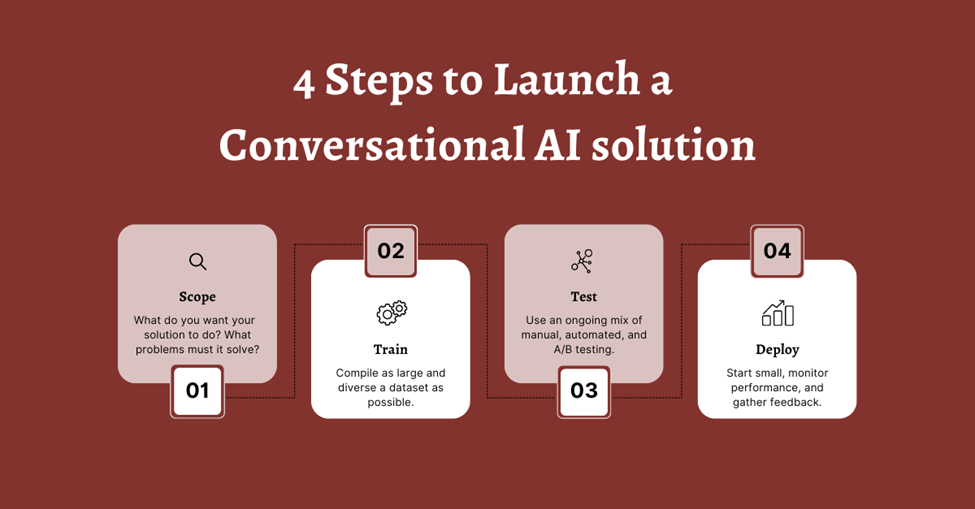
Building, testing, and deploying a conversational AI solution doesn’t have to be complicated. Mosaicx’s proven process guides you every step of the way. That includes defining goals and gathering data, fine-tuning the model, testing it in real scenarios, and finally deploying the system to your users.
You can follow this process on your own but working with Mosaicx comes with extra advantages. You get expert guidance at every stage and a platform that scales with your business needs. You also get reliable performance and cost-effective solutions that deliver fast ROI.
Get in touch today if you’re ready to see how conversational AI can transform your customer service. Let our experts help you build and deploy a solution tailored to your business.
Conversational AI is rapidly becoming a critical tool for businesses of all sizes. It can help businesses improve customer service, increase sales,...

One of the most common pain points for any customer service business is the cost of unanswered calls. You not only frustrate your customers who might...
.png)
Modern contact centers operate in a fundamentally different environment than before. There's a long line of customers coming through multiple...