
 Mosaicx
How to Build, Train, Test, and Deploy Conversational AI Solutions in 2026
Conversational AI is rapidly becoming a critical tool for businesses of all sizes. It can help businesses improve customer service, increase sales,...
Every day in a pharmacy comes down to balance. Your team juggles accuracy and efficiency, compliance and safety, paperwork and patient care, all at once. The right pharmacy software makes that balance possible.
These systems are changing how modern pharmacies operate by automating daily tasks, reducing errors, and giving pharmacists more time to focus on patient care. Here’s a look at some of the top pharmacy software solutions designed to simplify operations and support better care.
For decades, pharmacies have relied on paper records and manual workflows to manage their daily operations. Handwritten prescriptions, manual pill counts, and inventory logs on clipboards, etc, leave plenty of room for mistakes. It's why the FDA still receives more than 100,000 reports of medication errors every year.
Not to mention that when pharmacists are busy reading labels and checking expiration dates, they no longer have the time to personalize their engagement to gain their patients' trust.
Now, Specialized software handles most of the repetitive work that used to eat up a pharmacist’s day. Patients can now refill prescriptions right from their phones, get reminders when it’s time for a pickup, and never have to worry about running out of their meds.
Things have changed behind the counter as well. Pharmacies now have tools to track controlled substances through state databases and keep digital records that meet FDA, DEA, and HIPAA standards without piling paperwork.
Automated workflows, furthermore, streamline everything from prescription verification to insurance billing. With these systems in place, pharmacists can finally spend time consulting with patients about medications, while handling more prescriptions with fewer mistakes.
Below are the systems that are currently available in the market. Each comes with a different set of strengths and limitations.
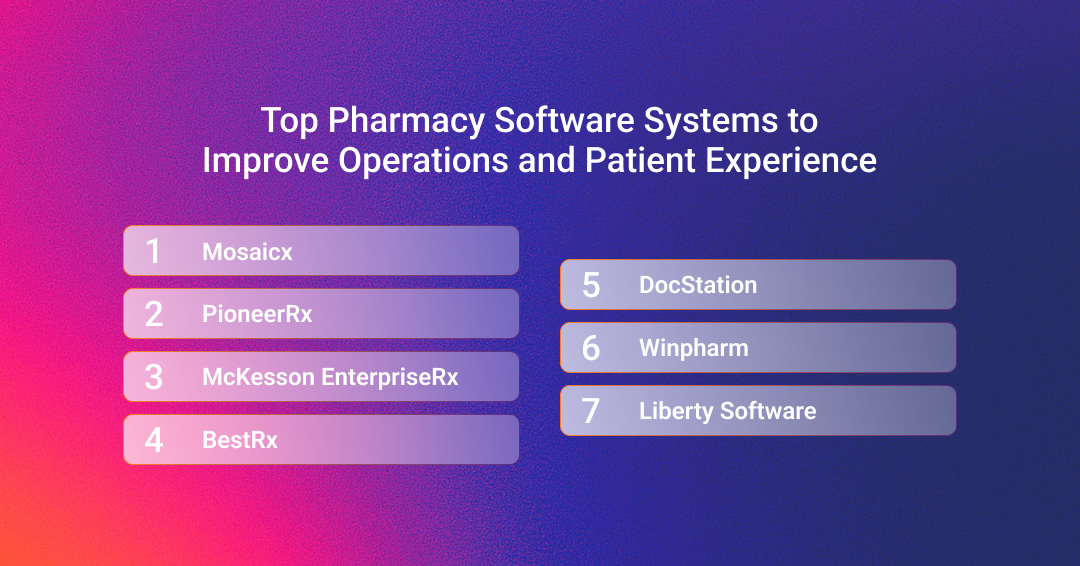
Mosaicx stands out among the best pharmacy software systems by addressing a problem most retail pharmacies deal with daily: the staff spending too much time on phone calls instead of patient care.
The platform combines conversational AI with automated outreach to handle several tasks like refill reminders and prescription status inquiries.
Patients can ask questions the way they naturally talk, and a virtual assistant responds in your pharmacy's voice while staying HIPAA-compliant.
You also don't have to worry about starting from scratch. The system connects with your existing pharmacy management system, so full deployment takes fewer days than most competitors.
Key Features:
What makes Mosaicx different is how it focuses on measurable results. You get dashboards that show how your pharmacy compares to others and dedicated support to adjust your workflows as well as improve your ROI.
The platform also includes practical tools like map links for directions, web payment options, and pickup QR codes that speed up the entire patient experience.
PioneerRx markets itself as a complete pharmacy management platform. You get prescription processing, point-of-sale, and mobile apps in one package. There’s also a handy feature to scan customer IDs directly from driver’s licenses, which speeds up your verification process.
Key Features:
PrioneerRx is designed to let your team manage multiple stores from the same platform. However, that may lead to performance issues based on your workloads. Running too many stores on the same server can sometimes freeze your screen or make the interface feel cluttered with too many statuses.
McKesson EnterpriseRx is another pharmacy system that allows you to operate from multiple locations. This one, however, is cloud-based, centralizing your operations and balancing workloads across locations, which helps when coordinating between several sites.
You also get enterprise reporting and analytics, which pair with automated communications between pharmacies, physicians, and patients. There are also tools that target medication adherence, making it a complete package for retail and health system pharmacies.
Key Features:
That said, some of the workflow and reporting functionalities are not as customizable, so you may have to work around the software rather than the other way around. Prescription processing can also be longer than expected from a modern system.
BestRx uses a Microsoft-based interface, which will feel familiar if your staff knows Windows. You can communicate with patients via text and app, and the system performs real-time benefit checks to prevent surprises at pickup.
Beyond that, you have your usual mix of automated prescription processing, point-of-sale integration, and central verification features.
Key Features:
The software's workflow and queue management tools could be smoother. Tasks like handling hold or reject queues aren't always as intuitive as they should be. You may also find gaps in reporting features, especially for over-the-counter sales and supplier-specific data. Also, while the system generally runs well, it can occasionally lag during busier hours.
DocStation takes a different approach. It provides clinical documentation and medical billing software for pharmacies that are expanding into billable services. If you're adding medication therapy management, immunizations, etc, to your pharmacy, DocStation helps you get reimbursed faster and easier for that work.
Key Features:
Just to clear the air, DocStation is meant to work with your dispensing system. It's not meant to replace it. You’ll still use your dispensing software for filling scripts, while DocStation takes care of the clinical workflows, care plans, and billing side of things.
Winpharm focuses on long-term customer relationships and customization. It's another Windows-based system, so your staff should have no issues finding their way around. It also integrates with wholesalers, which simplifies your inventory process.
Key Features:
Winpharm doesn't link refills on hold to previous or expired prescriptions, which means extra steps to connect related fills. Sometimes entering complex medication instructions (SIGs) isn't straightforward, and software updates happen during work hours, which interrupts whatever you're doing at the time.
Liberty Software targets retail and independent pharmacies. The platform includes three main modules: pharmacy management, POS, and multi-store management. You get compounding tools without needing separate modules, and the system handles immunization management with registry reporting to keep you compliant.
Key Features:
While Liberty Software offers strong functionality for independent pharmacies, you can sometimes come across inconsistencies in inventory tracking, where stock levels may not always update correctly. These issues can make the platform feel less reliable compared to newer pharmacy systems with more stable performance.
Investing in a pharmacy software system without proper planning is a mistake. You need to know exactly what the system needs to do and address. Start with these factors:
You can find plenty of generic business systems in the market. They are pretty cheap as well. However, they lack features specific to pharmacies. Even if they do, those features are often limited and fail to manage the growing complexity and workload of a busy pharmacy.
Specialized systems give you automation capabilities for your daily pharmacy workloads. They integrate with your existing systems to pull the right data, populate forms, verify insurance, generate labels, keep track of inventories, and do a whole lot more while meeting HIPAA regulations.
Generic software may promise such features, but they won't play as nicely with each other as they should. You'll have to find workarounds or find someone else to custom-build a proper workflow, which gets expensive fast, and even then, you might not meet regulatory standards.
Importantly, if you operate more than one pharmacy, specialized systems let you see everything from one place. Check inventory across locations, compare performance metrics, access patient records, etc.
The automation alone pays for itself. These features work right out of the box, no customization needed.
You don't need a single system that does everything. Many pharmacies have separate tools that work together. So, a pharmacy management software will do the core work like inventory tracking and prescription filling, while a patient engagement platform will handle reminders and communication. This way, you get specialized tools that actually do their job well instead of a single platform that's just average at everything.
When these systems connect properly, here's what happens:
Here's the trade-off: some pharmacy software systems include built-in engagement features. Everything's in one place, which works great if you want simple. However, you're stuck with whatever engagement tools the vendor offers.
Bigger pharmacies often prefer connecting separate systems. One handles pharmacy software systems for retail operations, another runs clinical programs, and a third manages patient communication. Each does one thing really well.
Both approaches get the job done as long as the integration works and information flows between your management and engagement systems without extra steps.
The best pharmacy software systems use AI to free your team to focus on in-person patient interactions. They can now actually focus on counseling patients, building enough trust to have them ask questions, review their medications, and basically, improve engagement. Here's how AI helps:
Give your pharmacy's staff their time back. Mosaicx's conversational AI platform isn't designed to be just a messenger. You’re getting a virtual partner that runs your day-to-day operations.
Mosaicx Engage handles everything from routine reminders to multi-step, nuanced workflows like appointment scheduling and insurance verification.
Our IVAs are smart enough to understand the context of your patients’ questions, providing accurate answers every time and escalating issues only when needed.
Your patients start feeling heard, not like just another number, and your pharmacists shift from clerical duties to meaningful patient care.
See the difference for yourself. Schedule a demo today and watch Mosaicx transform your pharmacy’s operations and patient engagement.

Conversational AI is rapidly becoming a critical tool for businesses of all sizes. It can help businesses improve customer service, increase sales,...

One of the most common pain points for any customer service business is the cost of unanswered calls. You not only frustrate your customers who might...
.png)
Modern contact centers operate in a fundamentally different environment than before. There's a long line of customers coming through multiple...